


Top 8 Best Tools to Humanize ChatGPT Text and Make It Undetectable
Last updated on January 19, 2025 by RGB Web Tech
Content creators, writers, students, and marketers now look for ways to humanize text from ChatGPT and make AI text undetectable without loss in clarity. Standard paraphrasers no longer solve this problem, so purpose-built humanizers have become a must. We reviewed the leading options that convert AI drafts into natural, believable language. The list highlights tools that outperform basic paraphrasers, strengthen rhythm and coherence, reduce detector scores, and help users humanize text with consistent quality.
How We Selected and Tested the Best AI Text Humanizers
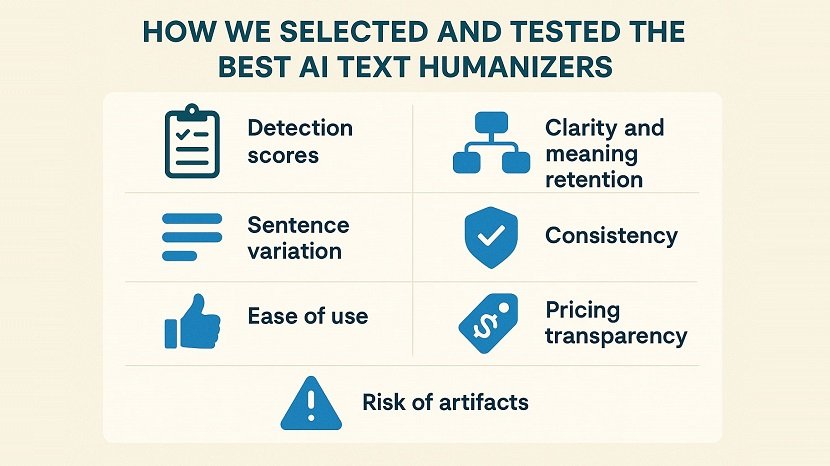
To rank the tools fairly, we applied a unified testing framework that measures how well each platform converts AI-generated text into natural, human-sounding writing that passes modern AI detectors. We started with five standardized ChatGPT samples across different formats: an academic paragraph, a blog introduction, a product description, a marketing section, and a short analytical essay. Each sample contained the typical patterns that detectors flag.
Each tool then rewrote the same samples, humanizing ai articles under identical conditions. We measured:
- Detection scores in ZeroGPT, GPTZero, Originality.ai, Copyleaks, and two lightweight open-source detectors.
- Clarity and meaning retention, judged by whether the final text preserved the original information.
- Sentence variation, including rhythm, structure, and vocabulary spread
- Consistency, checked across multiple rewrites to see if the tool outputs erratic or stable results.
- Ease of use, word limits, modes, and workflow speed.
- Pricing transparency, including free-plan usefulness.
- Risk of artifacts, such as factual distortions or unnatural word swaps.
Detector performance played a major role. A tool ranked higher when it produced text that detectors classified primarily as human without degrading readability. We also examined tone control, since many users want text that sounds natural and stylistically diverse, not simply “undetectable,” and many humanizers fail to deliver natural-sounding outputs, as we can see in many Reddit threads, where users call out tools that fail to deliver realistic results. Tools that allowed fine-grained tuning of style or rewriting depth scored higher.
Top 8 Best Humanizers to Make Your Writing Sound Less Like AI
Our evaluation identified eight platforms that consistently humanize AI copy with clear structure and strong detector performance. The following reviews outline their key features, strengths, limitations, pricing, and results from our tests so readers can choose the option that fits their writing workflow.
1. Clever AI Humanizer

Clever AI Humanizer itself as a truly free solution for users who want to humanize AI text without ads, paywalls, or credit limits. The tool offers up to 200,000 free words per month, supports 7,000 words per run, and rewrites AI-generated content in a natural tone that avoids rigid patterns. Its interface allows you to select a writing style (casual, formal, academic) and instantly generate a human-sounding version.
Pros
- Fully free AI humanizer with no ads or locked features.
- High monthly word allowance and a large 7,000-word conversion limit.
- Natural, polished rewriting that avoids awkward or low-quality phrasing.
- Strong performance across major detectors such as ZeroGPT, GPTZero, Copyleaks, and Grammarly.
- Simple workflow that allows quick “AI to human” conversion for any niche.
- Stable readability without over-casual “forum-style” distortion.
Cons
- Longer or more technical passages may still require light manual refinement.
- Does not include advanced features such as tone customization beyond a basic style selector.
Pricing: Clever AI Humanizer remains completely free. There are no monthly fees, credit packages, paywalls, or premium tiers.
Performance: Clever AI Humanizer delivers the strongest free performance we tested. It consistently lowered GPTZero and ZeroGPT detection scores on standard ChatGPT paragraphs and maintained a clear, human-like flow. The tool handled medium-length and narrative content especially well. Although no humanizer can guarantee a perfect score across all detectors, Clever AI Humanizer offered reliable “human” results in most tests without compromising readability.
2. Undetectable AI

Undetectable AI offers a dual-module platform: an AI detector that checks text against major detection engines (GPTZero, Originality.ai, etc) and a built-in humanizer that rewrites AI-generated content into more natural, human-like prose. Undetectable AI markets itself to writers, bloggers, students, and researchers who want to produce clean, legible text that scores as human and avoids AI-driven false flags in academic or workplace settings.
Pros
- Multi-detector analysis delivers results from several AI checkers at once.
- Strong humanization engine that reshapes tone and structure into natural writing.
- Fast processing time and reliable handling of medium-length inputs.
- Widely recognized by reviewers from Forbes, USA Today, PC Guide, Business Insider, and more.
- Supports dozens of languages, including English, German, Spanish, French, Italian, Ukrainian, and Japanese.
- Offers humanized content that remains readable, coherent, and unique.
Cons
- User reviews express concerns about output quality: grammatical issues, awkward phrasing.
- Some inconsistency in detector-bypass performance according to real-world tests.
- Free tier may impose stringent word limits or fewer controls.
Pricing: Undetectable AI offers a yearly option at $5 per month, billed as $60 annually, which provides 10,000 words each month. Users who prefer flexibility can choose the $19 monthly plan, which raises the allowance to 20,000 words. Larger teams and high-volume creators can request a custom business plan with non-expiring credits, bulk pricing, API access, and white-label support tailored to their workload.
Performance: This AI to human text converter performs strongly on detection/humanization integration, which makes it a good choice for workflows that need both scanning and rewriting. However while you can make your text human with undetectable AI successfully, user reports show mixed results: some still triggered flags in GPTZero or received odd rewrites. So the tool is useful, but users should manually review outputs and not rely on it alone.
3. EssayDone.ai

EssayDone.ai targets academic-style text, where users need natural flow and consistent argumentation. The platform uses multi-step transformation layers to humanize AI writing, adjust tone, vocabulary, sentence structure, and logical transitions. It preserves academic voice better than most tools, especially when handling long analytical paragraphs. It supports up to 5,000 words per input, offers multiple rewrite intensities (Basic > Pro).
Pros
- Supports large text inputs, which suits essays, reports, and long assignments.
- Offers several rewrite intensities and alternative versions to choose from.
- Includes built-in grammar and spelling correction during rewriting.
Cons
- Free access remains extremely limited, with most functions restricted to higher tiers
- Some user feedback notes that strong rewriting levels may shift tone or alter meaning.
- Geared primarily toward academic content rather than marketing or SEO needs.
Pricing: EssayDone offers three subscription tiers. The Basic Plan costs $15 per month, the Pro Plan costs $25 per month, and the Ultra Plan costs $39 per month.
Performance: EssayDone.ai delivered strong results in our testing, scoring as human across Turnitin-style systems and sharply lowering GPTZero and Originality.ai AI detection scores. The tool handled long inputs well, preserved meaning, and produced clear, readable text without the odd distortions. However, the platform shows its limitations. Pricing sits noticeably higher than comparable humanizers, and the interface leans heavily toward academic use.
4. WriteHuman AI

WriteHuman AI positions itself as a refined ChatGPT humanizer that focuses on readable, emotionally natural text rather than aggressive distortion. The platform accepts content from ChatGPT, Claude, DeepSeek, Gemini, and other models, then rewrites it with more authentic phrasing, clearer rhythm, and stronger flow. Its “Enhanced Model” strengthens sentence structure, removes AI-like stiffness, and increases variation.
Pros
- Produces clear, human-like phrasing with stronger emotional depth.
- Built-in AI detector helps confirm detection safety before exporting.
- Enhanced Model improves rhythm and flow without over-rewriting
- Supports multiple AI sources, including ChatGPT and Claude.
- Free tier available with small monthly allowance.
Cons
- Lower word limits per request compared to long-form-focused humanizers.
- Performance depends on the Enhanced Model; base model sometimes feels light.
- Pricing rises quickly if users rely on higher monthly capacities.
Pricing: WriteHuman offers three paid tiers. The Basic plan costs $12 per month and supports 80 requests at 600 words each. The Pro plan raises capacity to 200 requests at 1,200 words for $18 per month and adds faster support. The Ultra plan costs $36 per month and unlocks unlimited requests with a 3,000-word limit per input.
Performance: In our evaluation, WriteHuman AI delivered clean, high-readability output that scored as human on Copyleaks and GPTZero for short and mid-length samples. While it's a great tool, WriteHuman struggled with longer academic content due to modest word caps, and some outputs required a light manual pass to adjust overly polished phrasing.
5. HumanizerPro.ai

HumanizerPro.ai focuses on structured, meaning-safe rewriting that improves clarity and pacing. The platform supports multiple languages and includes additional tools such as an AI detector and fact checker. Unlike lighter humanizers, HumanizerPro.ai applies controlled linguistic adjustments that preserve the original message, which makes it suitable for academic and general-purpose AI writing.
Pros
- Produces stable, readable rewrites suitable for multiple writing domains.
- Applies structured linguistic changes rather than chaotic paraphrasing.
- Maintains meaning without introducing errors or overly chatty tone.
- Works well for users who want moderate rewriting rather than full transformation.
Cons
- Limited public benchmarks and fewer independent tests. Lacks deeper customization options for writing style or voice. Interface feels basic compared to newer, detector-focused platforms.
Pricing: HumanizerPro.ai offers three annual subscription plans. The Basic plan costs $7 per month (billed $84 annually). The Pro plan costs $12 per month (billed $144 annually) The Advanced plan costs $19 per month (billed $228 annually).
Performance: HumanizerPro.ai produced clean output in our tests and lowered detection scores on GPTZero and Copyleaks for short to mid-length samples. It handled academic-style text well but showed less impact on highly structured technical writing. Limited public benchmarks weaken its position compared to more established competitors.
6. Phrasly.AI

Phrasly.AI presents itself as a low-cost humanizer with a focus on simplicity and accessibility. It rewrites AI-generated content into clearer, more natural text and includes basic tone controls for casual and formal output. Its interface suits students and smaller teams that need fast rewrites without advanced features. The platform aims to bypass detectors such as GPTZero and Originality.ai, though community feedback shows inconsistent results.
Pros
- Lower pricing makes it accessible for students and early-stage creators
- Simple workflow that handles quick rewrites
- Suitable for improving clarity on shorter texts
Cons
- Frequent user complaints about billing issues and unreliable support
- Inconsistent detector performance on strict systems
Pricing: Offers a Free plan (550 words humanization + 3 content-generation credits) and an “Unlimited” plan starting at $10.99 per month (billed annually).
Performance: In our testing, Phrasly.AI improved readability but struggled to consistently bypass strict detectors such as GPTZero and Originality.ai. Outputs occasionally felt shallow or minimally transformed, especially on longer samples. Combined with numerous community concerns about support and billing, this tool ranks lower for high-stakes rewriting.
7. StealthGPT

StealthGPT positions itself as a fast, practical ChatGPT humanizer designed for small and medium-length text. It focuses on rewriting paragraphs into more conversational, human-like language. The platform advertises detectable-to-human score improvements across systems such as GPTZero and ZeroGPT. Its simplicity suits users who want quick output rather than deep customization. StealthGPT’s engine applies structured variation to tone and pacing but remains lighter than academic-oriented tools.
Pros
- Reliable for short-form content such as posts, summaries, and quick drafts.
- Faster processing than some larger platforms.
- Affordable entry cost for individual creators.
Cons
- Limited effectiveness on long-form or complex documents.
- Transformer tends to simplify tone, which may reduce precision in academic writing.
- Detector drops are solid but weaker than top-ranked tools.
Pricing: Official pricing shows an Essential plan at US $24.99/month, Pro at US $34.99/month, Business at US $49.99/month (billing annually).
Performance: StealthGPT delivered a noticeable drop in AI detection scores on GPTZero and ZeroGPT for short-form content, with average reductions around the mid-70% range. The tool remained stable on simple inputs but struggled with dense academic paragraphs and technical writing. Its biggest strength lies in speed and accessibility rather than deep structural transformation.
8. Quillbot

QuillBot stands as one of the most widely used paraphrasing tools and supports AI-to-human rewriting through its fluency and tone-adjustment modes. While not built to bypass AI detectors, QuillBot improves clarity and stylistic flow, which helps disguise AI patterns in many cases. It also integrates grammar checking, summarization, and citation assistance inside the same workspace.
Pros
- Established and trusted rewriting platform with strong readability improvements.
- Multiple tone and paraphrasing modes.
- Integrated grammar checker and supportive writing tools.
Cons
- Not optimized specifically for detector bypass.
- Advanced features require a paid subscription.
Pricing: Premium individual plan is approx $8.33/month (billed annually) or ~$19.95/month if billed monthly. Team plans start at ~$7.50/user/month.
Performance: QuillBot improved readability and flow in our tests but only moderately reduced detection scores on strict systems such as GPTZero and Originality.ai. It works best as a polishing tool rather than a primary AI humanizer. Users who want smoother, more natural writing will benefit from QuillBot, especially when pairing it with a separate detector-focused humanizer.
How to Humanize ChatGPT Text Without Only Relying on Tools
You can humanize ChatGPT manually after you use any AI humanizer for better results. Simple edits already push the text away from predictable AI patterns:
- Change the structure. Move sentences, split long blocks, or start with a short opener to make the text sound more human.
- Add specific details. Insert small personal observations or concrete examples AI usually avoids.
- Vary sentence length. Mix short lines with longer explanations to increase natural rhythm and make AI text undetectable.
- Replace generic phrases. Swap typical AI wording (“in today’s world,” “in conclusion”) for more direct expressions.
- Use natural connectors. Add rhetorical questions or conversational transitions that fit your voice.
- Apply a hybrid workflow. Draft in ChatGPT, apply manual edits, finish with AI-to-human text converter to refine tone.
These small adjustments sharpen the output and help your content read as genuinely human-written.
FAQ ( Frequently Asked Questions)
1. Can AI humanizers really bypass GPT zero and similar detectors every time?
Answer: No tool can guarantee a perfect bypass in every situation. Detectors update their models and react to new rewriting patterns. A strong AI humanizer can drop detection scores, but results still depend on input quality, text length, tone, and context. The safest approach mixes a humanizer, manual refinement, and a final check with multiple detectors. Consistent success requires both good tools and careful editing rather than blind trust in automation.
2. Is it legal to make AI text undetectable for school or work?
Answer: The process itself is legal, but institutions often set rules that restrict hidden AI use. A university may treat undisclosed AI assistance as academic misconduct, and a workplace may expect transparent authorship. The legal system does not forbid AI humanizers, but policy violations can still result in penalties, so users must follow the rules of their school or employer. Anyone working in a regulated field should review internal guidelines before relying on AI tools.
3. Do AI humanizers hurt or help SEO in 2025?
Answer: High-quality humanized text helps SEO when it reads naturally, stays factual, and adds unique value. Search engines rank human-sounding, clear, well-structured content higher than robotic prose. Issues arise when a humanizer produces incoherent text, loses meaning, or adds random noise to bypass detectors. When used correctly, humanized AI text supports SEO rather than harming it. The key is to maintain clarity and topical depth so the page satisfies user intent.
4. Is a free AI humanizer enough to make writing sound more human, or do I need a paid plan?
Answer: A free AI humanizer is great and mostly enough for the majority of users. Paid plans usually provide higher word limits and better consistency with detectors like Originality.ai. If you handle long reports, academic work, or professional content, a paid plan offers far more reliable results. Free tools work, of course, but serious workflows benefit from the stability of paid versions.
If you found this article helpful, we encourage you to share it on your social media platforms—because sharing is caring! For more information about article submissions on our website, feel free to reach out to us via email.
Send an email
Written by RGB Web Tech
Latest Technology Trends
Latest technology trends shaping the future, including AI advancements, blockchain innovation, 5G connectivity, IoT integration, and sustainable tech solutions. Explore breakthroughs in quantum computing, cybersecurity, augmented reality, and edge computing. Stay ahead with insights into transformative technologies driving innovation across industries and revolutionizing how we live, work, and connect.