


What is Technical SEO? Best Practices and a Checklist
Last updated on January 19, 2025 by RGB Web Tech
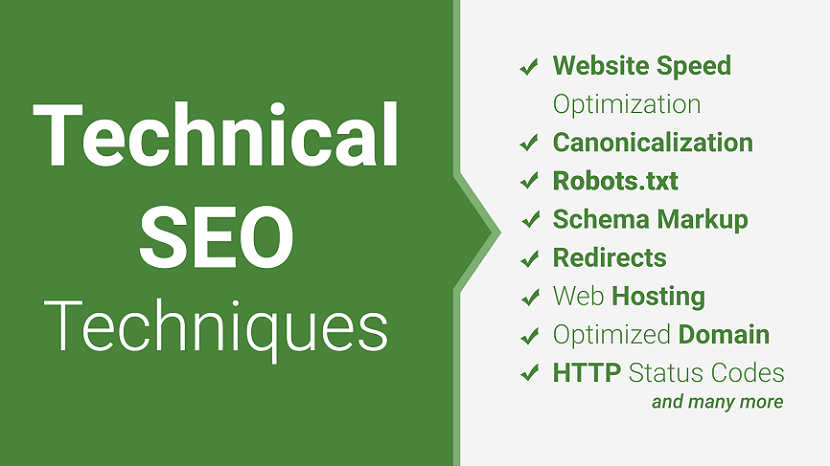
Technical SEO refers to the process of optimizing your website for the crawling and indexing phase. With technical SEO, you can help search engines access, crawl, interpret and index your website without any problems.
It is called “technical” because it has nothing to do with the actual content of the website or with website promotion. The main goal of technical SEO is to optimize the infrastructure of a website.
If you want your site to rank on Google and increase your brand's organic traffic, you’ll need to look at On Page SEO, Off Page SEO and Local SEO also.
But before you starting SEO also learn techniques of SEO ( White Hat SEO, Black Hat SEO, Gray Hat SEO and Negative SEO )
To understand what is the true meaning of technical SEO, let’s start with some basic terminology.
1. Doctype
The HTML document type declaration, also known as DOCTYPE, is the first line of code required in every HTML or XHTML document. The DOCTYPE declaration is an instruction to the web browser about what version of HTML the page is written in. This ensures that the web page is parsed the same way by different web browsers.
In HTML 4.01, the DOCTYPE declaration refers to a document type definition (DTD). A DTD defines the structure and the legal elements of an XML document. Because HTML 4.01 was based on the Standard Generalized Markup Language (SGML), referring to a DTD in the DOCTYPE declaration was necessary.
Additionally, doctypes for HTML 4.01 required the declaration of either strict, transitional, or frameset DTD, each with a different use case as outlined below.
Strict DTD: Used for web pages that exclude attributes and elements that W3C expects to phase out as CSS support grows
Transitional DTD: Used for web pages that include attributes and elements that W3C expects to phase out as CSS support grows
Frameset DTD: Used for web pages with frames
In contrast, the declaration of HTML5 DOCTYPE is much simpler: it no longer requires a reference to DTDs as it is no longer based on SGML. See the examples below for a comparison between HTML 4.01 and HTML5 DOCTYPEs.
Examples:
Doctype syntax for HTML5:
Doctype syntax for strict HTML 4.01:
Doctype syntax for transitional HTML 4.01:
Doctype syntax for frameset HTML 4.01:
2. Canonicalization
A canonical tag is a way of telling search engines that a specific URL represents the master copy of a page. Using the canonical tag prevents problems caused by identical or "duplicate" content appearing on multiple URLs. Practically speaking, the canonical tag tells search engines which version of a URL you want to appear in search results.
Canonicalization Examples
- Versions of URLs with and without "www"
- URLs with and without "index.html" at the end
- Variants of URLs with "HTTP" and "HTTPS" protocols
- Uppercase and lowercase letters in URLs
3. Robots.txt
Robots.txt is a text file webmasters create to instruct web robots (typically search engine robots) how to crawl pages on their website. The robots.txt file is part of the the robots exclusion protocol (REP), a group of web standards that regulate how robots crawl the web, access and index content, and serve that content up to users. The REP also includes directives like meta robots, as well as page-, subdirectory-, or site-wide instructions for how search engines should treat links (such as “follow” or “nofollow”).
In practice, robots.txt files indicate whether certain user agents (web-crawling software) can or cannot crawl parts of a website. These crawl instructions are specified by “disallowing” or “allowing” the behavior of certain (or all) user agents.
Basic format:
4. Schema Markup
Schema markup is code that helps search engines to understand your content and better represent it in the search results.
Schema markup powers rich snippets, which often have higher clickthrough rates than ‘regular’ search results. That means more traffic to your site.
However, the primary function of the markup is to help search engines better understand your content.
It’s no coincidence that schema.org, the community behind the markup, was created a year before Google’s Knowledge Graph—a knowledge base of entities and the relationships between them—came to life.
And you guessed it, one of the primary sources for this data is the schema markup.
What are the types of Schema Markups?
There are hundreds of different markup types because there are so many different questions people turn to search engines to answer. But here are the 10 most common schema markups that are used.
- Organization Schema Markup
- Person Market Schema Markup
- Local Business Schema Markup
- Product & Offer Schema Markup
- Breadcrumbs Markup
- Article Schema Markup
- Video Schema Markup
- Event Schema Markup
- Recipe Schema Markup
- Rating/Review Schema Markup
5. Sitemaps Updates (XML, Text, HTML)
A sitemap helps search engines discover URLs on your site, but it doesn't guarantee that all the items in your sitemap will be crawled and indexed. However, in most cases, your site will benefit from having a sitemap.
It is also essential to know there are two different types of sitemaps.
- XML sitemaps
- HTML sitemaps
You can Generator Sitemaps for your website here
- XML-Sitemaps - https://www.xml-sitemaps.com
- Small SEO Tools - https://smallseotools.com/xml-sitemap-generator/
6. HTTP Status Codes
The Status-Code element in a server response, is a 3-digit integer where the first digit of the Status-Code defines the class of response and the last two digits do not have any categorization role. There are 5 values for the first digit:
- 1xx: Informational : It means the request has been received and the process is continuing.
- 2xx: Success : It means the action was successfully received, understood, and accepted.
- 3xx: Redirection : It means further action must be taken in order to complete the request.
- 4xx: Client Error : It means the request contains incorrect syntax or cannot be fulfilled.
- 5xx: Server Error : It means the server failed to fulfill an apparently valid request.
7. Website Speed Optimization
The term page speed essentially refers to the length of time at which web pages or media content is downloaded from website hosting servers and displayed onto the requesting web browser. Page load time is the duration between clicking the link and displaying the entire content from the web page on the requesting browser.
You can test your website here
- PageSpeed Insights - https://pagespeed.web.dev
- GTmetrix - https://gtmetrix.com
Once you have tested the speed of your website, you can start optimizing it. There are a lot of different ways to make your website work faster and we created the list of the most effective ones.
- Use a Content Delivery Network (CDN)
- Move your website to a better host
- Optimize the size of images on your website
- Reduce the number of plugins
- Minimize the number of JavaScript and CSS files
- Use website caching
- Implement Gzip Compression
- Database optimization in CMS
- Reduce the use of web fonts
- Detect 404 errors
- Reduce redirects
- Use prefetching techniques
8. Web Hosting
Web hosting is an online service that allows you to publish your website files onto the internet. So, anyone who has access to the internet has access to your website. In practice, it usually refers to the service you get from a web hosting provider like Bluehost.com
9. Optimized Domain
An SEO-optimized domain name is a domain name that introduces your website and tells search engines and users what your website is about, or about the type of products and services it offers, etc. Such domains are more likely to stand out in the search result listings and to get clicked. So, a right domain name helps you target your audience and improve your search engine rankings. You can choose a branding domain or a keyword domain.
10. Redirects
Every page on the web has an address, a URL, which stands for ‘Uniform Resource Locator’. Sometimes, content moves from one URL to another URL. That’s when you need a redirect. A redirect automatically makes a browser go from one URL to another URL.
Types of redirects
- Serverside redirects
- Client-Side redirects
11. Core Web Vitals
Core Web Vitals are the subset of Web Vitals that apply to all web pages, should be measured by all site owners, and will be surfaced across all Google tools. Each of the Core Web Vitals represents a distinct facet of the user experience, is measurable in the field, and reflects the real-world experience of a critical user-centric outcome.
The metrics that make up Core Web Vitals will evolve over time. The current set for 2020 focuses on three aspects of the user experience—loading, interactivity, and visual stability—and includes the following metrics (and their respective thresholds):
- Largest Contentful Paint (LCP): measures loading performance. To provide a good user experience, LCP should occur within 2.5 seconds of when the page first starts loading.
- First Input Delay (FID): measures interactivity. To provide a good user experience, pages should have a FID of 100 milliseconds or less.
- Cumulative Layout Shift (CLS): measures visual stability. To provide a good user experience, pages should maintain a CLS of 0.1. or less.
12. W3C Validation
W3C validation is the process of checking a website's code to determine if it follows the formatting standards. If you fail to validate your website's pages based on W3C standards, your website will most likely suffer from errors or poor traffic owing to poor formatting and readability.
Why Validate a Site on W3C?
- Help Improve Rankings in Search Engines
- Validation Helps Teach Best Practices
- Improved Website User Experience
- Make Website Browsers Friendly
- Multiple Device Accessibility
- Validation Help for Easy Coding and Maintenance
- Validation as a Debugging Tool
How Do You Validate Your Code?
- HTML Validator - https://validator.w3.org
- CSS Validator - https://jigsaw.w3.org/css-validator/
13. Google Search Console
Search Console is a tool from Google that can help anyone with a website to understand how they are performing on Google Search, and what they can do to improve their appearance on search to bring more relevant traffic to their websites.
Search Console provides information on how Google crawls, indexes, and serves websites. This can help website owners to monitor and optimize Search performance.
There is no need to log in to the tool every day. If new issues are found by Google on your site, you'll receive an email from Search Console alerting you. But you might want to check your account around once every month, or when you make changes to the site's content, to make sure the data is stable. Learn more about managing your site with Search Console.
To get started, follow these steps:
- Verify site ownership.
- Make sure Google can find and read your pages.
- Review mobile usability errors Google found on your site.
- Consider submitting a sitemap to the Search Console.
- Monitor your site's performance.
14. Google Analytics
Google Analytics is a website traffic analysis application that provides real-time statistics and analysis of user interaction with the website. Google analytics enables website owners to analyze their visitors, with the objective of interpreting and optimizing website’s performance. Google analytics can track all forms of digital media and refer to upstream web destinations, banner and contextual advertisements, e-mail and integrate with other Google products.
Google Analytics Benefits
- Track Online Traffic
- Understand User Behavior
- Offline to Online Tracking
- Data Reports and Customization
- Improve Online Advertising with Marketing Analytics
- Improve Search Engine Optimization and Content Marketing
- Google Analytics Conversion Tracking
- Find your Target Audience
- Google Analytics Cost
- Google Analytics Improves Websites
- Getting Started is Easy
- New Ideas for Business
- eCommerce Performance
15. Google Tag Manager
Manage all your website tags without editing code. Google Tag Manager delivers simple, reliable, easily integrated tag management solutions for free.
How tag management solutions can help.
- Increase your agility : Efficiently add and update your own website tags to better understand conversions, site analytics, and more.
- Integrate easily : Tag Manager supports and integrates with all Google and third-party tags.
- Put your mind at ease : Error checking, security features, and speedy tag loading ensure that all your tags work.
- Collaborate across your team : Improve collaboration across your business. Features like workspaces, granular access controls, and support for multi-environment testing mean that marketing and IT can work together efficiently.
16. Bing Search Console
Bing Webmaster Tools (Bing WMT) is a free Microsoft service that allows webmasters to add their sites to the Bing crawler so they show up in the search engine.
It also helps to monitor and maintain a site’s presence. Bing Webmaster Tools is to the Bing search engine, what Google Search Console is to Google.
How is the search console helpful?
- Monitor your site’s performance and see what keywords you rank for.
- See how Bing crawls and indexes your site.
- Submit your website / new pages to be crawled.
- Remove any content you do not want to be indexed.
- Disavow links.
- Monitor and resolve potential malware or spam issues.
17. Yandex Search Console
Yandex webmaster tools is a free web service provided by Yandex for webmasters to monitor their site’s performance in the Yandex search engine.
You can use it to upload a sitemap, see how much traffic you are getting, get a list of indexed pages, see crawling or indexing errors, site speed problems, etc.
It serves a similar purpose as Google Search Console and Bing & Yahoo Webmaster Tools.
18. Conversion Rate Optimization
Conversion rate optimization (CRO) is the practice of increasing the percentage of users who perform a desired action on a website. Desired actions can include purchasing a product, clicking ‘add to cart’, signing up for a service, filling out a form, or clicking on a link.
Conversion optimization best practices
- Use a strong color for all CTA (call-to-action) buttons
- Place CTAs above the fold
- Use urgency (e.g., time-limited offers) to drive sales
- Always display testimonials
- Use fewer form fields on your forms
FAQ - Technical SEO
1. What is Technical SEO?
Technical SEO refers to optimizing your website’s technical elements to ensure that search engines can crawl, index, and render your web pages correctly.
2. Why is Technical SEO important?
Technical SEO is essential because it helps you build a website that search engines can easily understand. If a search engine is able to crawl, index, and render your web pages correctly, it increases your chances of ranking in search results.
Final Thoughts
Technical SEO is not something you can master in a day or two. It requires lots of dedicated research and some trial and error. So keep working and finding Technical SEO errors on your website and resolve them ASAP.
Along with Technical SEO keep working on On Page SEO, Off Page SEO, and Local SEO regularly
If you found this article helpful, we encourage you to share it on your social media platforms—because sharing is caring! For more information about article submissions on our website, feel free to reach out to us via email.
Send an email
Written by RGB Web Tech
Latest Technology Trends
Latest technology trends shaping the future, including AI advancements, blockchain innovation, 5G connectivity, IoT integration, and sustainable tech solutions. Explore breakthroughs in quantum computing, cybersecurity, augmented reality, and edge computing. Stay ahead with insights into transformative technologies driving innovation across industries and revolutionizing how we live, work, and connect.
How Open-Source Technology Is Expanding Global Access to Books
Last updated on January 19, 2025 by RGB Web Tech

The roots of open-source in reading
Open-source projects have always thrived on the idea of sharing knowledge freely. That spirit found a natural home in the world of books. Libraries once depended on bricks and mortar while their digital counterparts now run on collaborative code that anyone can use and improve. This shift has lowered costs for hosting and maintaining e-libraries and made it easier for readers around the world to step inside vast collections without worrying about walls or opening hours.
The open-source approach is not only about saving money. It also builds trust. Readers know the systems are transparent because the code is out in the open. Developers from every corner of the globe can check it refine it and suggest new features. That openness means the platforms evolve quickly and respond to real needs instead of sitting still in outdated forms. In many ways free reading online feels complete with Z-lib because it blends shared technology with shared culture.
Building bridges with shared tools
A powerful part of this movement is the way open-source tools break down barriers between different regions. Book formats once stood like locked doors. One platform would only handle a specific file type and readers were left scrambling for converters. Now common standards like EPUB and PDF flow through open-source software so a story can travel from one server to another without losing its shape.
This reach is not only technical. It carries cultural weight. A child in Nairobi can open the same file as a professor in Berlin without extra steps. That kind of unity shows how technology turns what once felt like local treasures into global resources. It is not magic but it feels close. And it shows that the simple act of reading has become a shared human thread woven tighter than ever.
To see how this plays out it helps to look at a few clear examples:
- Community driven catalogues : These catalogues are not managed by a single publisher but by thousands of volunteers who add and organize titles. The result is a living bookshelf that reflects a broad mix of cultures. Because the code is open anyone can add new features that improve search functions or highlight rare works. The scale can be massive but the heart remains human because it is powered by collective care.
- Translation networks : Open-source tools for translation have grown sharper over the years. They allow volunteers to work together on making books available in dozens of languages. Each new translation is like a bridge laid down across a river once thought impassable. Readers gain access to worlds of thought they never knew existed. Over time these networks do more than share words. They foster understanding across borders.
- Preservation projects : Digital preservation once required expensive custom systems. Now open-source software handles the heavy lifting of scanning tagging and storing rare texts. The result is an archive that will outlast shifting hardware and formats. Scholars rely on these projects to keep fragile works alive. Everyday readers benefit as well when once hidden materials become a click away.
Together these examples paint a picture of resilience. They show that open-source tools are not just about convenience. They ensure stories endure and spread.
The ripple effect of open access
When more people can read more books the impact ripples outward. It shows up in classrooms where teachers lean on free e-libraries to fill gaps left by limited budgets. It shows up in small towns where local libraries extend their reach through digital partners. And it shows up in living rooms where someone discovers a new author late at night without spending a dime.
The name for this is access. Not access in theory but in practice. Open-source technology has turned it into something tangible. The power is not only in the number of books but in the freedom to use them without walls. That freedom carries into research into art into daily conversation. It is the quiet force shaping a more connected world.
Turning the page
Open-source projects will not stop growing because the appetite for shared knowledge never fades. As new tools appear they blend into the ecosystem and make it easier for developers to craft fresh experiences. Some focus on speed others on design but all of them add bricks to the same house.
The story is simple. People want to read and people want to share. Open-source technology makes both possible on a scale that once felt out of reach. The libraries built today may not smell of old paper yet they carry the same promise. They are proof that stories are never locked away. They travel across servers screens and minds lighting the way for the next reader who comes along.
If you found this article helpful, we encourage you to share it on your social media platforms—because sharing is caring! For more information about article submissions on our website, feel free to reach out to us via email.
Send an emailWritten by RGB Web Tech
Latest Technology Trends
Latest technology trends shaping the future, including AI advancements, blockchain innovation, 5G connectivity, IoT integration, and sustainable tech solutions. Explore breakthroughs in quantum computing, cybersecurity, augmented reality, and edge computing. Stay ahead with insights into transformative technologies driving innovation across industries and revolutionizing how we live, work, and connect.